 GEAR
GEARRush: the first new mode in years
Rush is a queued 3v3 mode, and it does not look much like Counter-Strike. There is no bomb. Instead you fight through a run of battle arenas that are picked at random for every match, so the same sequence never comes round twice.
A round is won by controlling the tower, which you do by eliminating the enemy team — or by holding it when the timer runs out. Win your way along the gauntlet and you reach the opponent’scastle, which wins the match. Valve has added a Rush friends leaderboard, so the mode is built around bragging rights rather than rating.
Money and time are both deliberately tight. With three players and a short clock, Rush rewards decisive contact over the slow map control that wins Premier rounds, which is presumably the point of shipping it as a separate queue rather than a Premier variant.
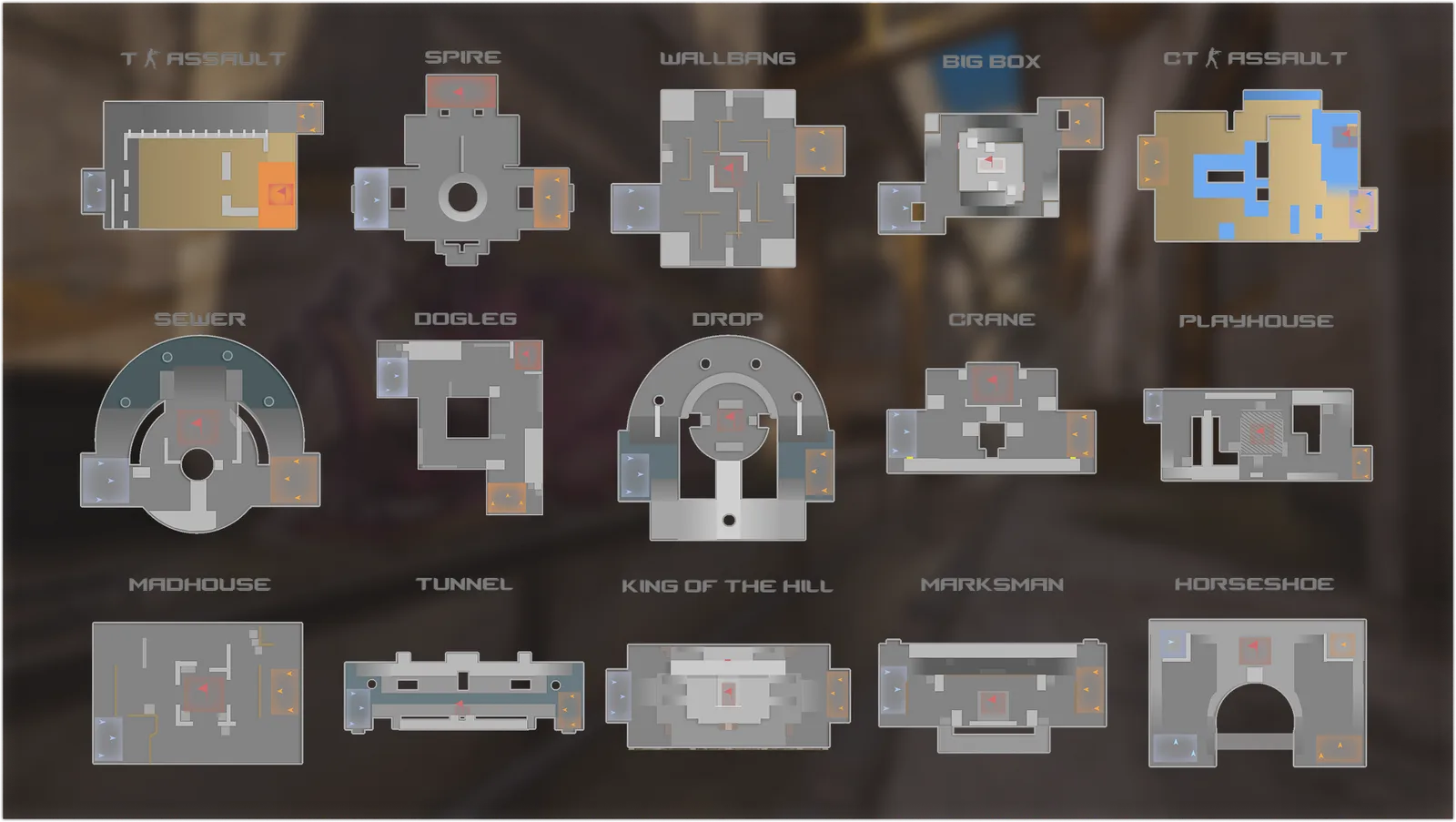
All fifteen Rush arenas
Valve never listed these in writing — but every one is labelled on the sheet above, so here they are in text:
- T Assault
- Spire
- Wallbang
- Big Box
- CT Assault
- Sewer
- Dogleg
- Drop
- Crane
- Playhouse
- Madhouse
- Tunnel
- King of the Hill
- Marksman
- Horseshoe
The layouts tell you most of what you need. Some are broadly symmetrical duels — Spire, Drop andHorseshoe are built around a central structure. Others are deliberately lopsided: T Assault andCT Assault give each side a distinctly different job, and Wallbang is a lattice of thin walls, which the name rather gives away.
The crosshair system was rebuilt
This is the part every other outlet gave two lines, and it is the change most likely to affect you every single round.
Crosshairs are now resolution independent
Before this update, crosshair dimensions were effectively measured in screen pixels. A cl_crosshairsize 2 crosshair was physically the same number of pixels whether you played at 1920×1080 or at a stretched 1280×960 — which meant it covered a visibly different share of your screen at each one. Anyone who has ever switched between native and stretched knows the routine: change resolution, re-tune the crosshair.
Valve has now made crosshairs resolution independent. The same settings are meant to produce the same crosshair everywhere.
The practical consequence: if you play on a stretched or non-native resolution, your crosshair almost certainly changed size when you launched the game today, without you touching a setting. If it feels wrong, it is not you — re-tune the size and gap once and it should now stay put across every resolution you use.
Eight styles, five of them new
Crosshair settings have moved into their ownCrosshair/Scopes tab. Valve named only the new default in the notes, but the settings screen in its own announcement image shows the whole dropdown — and tags which entries are new:
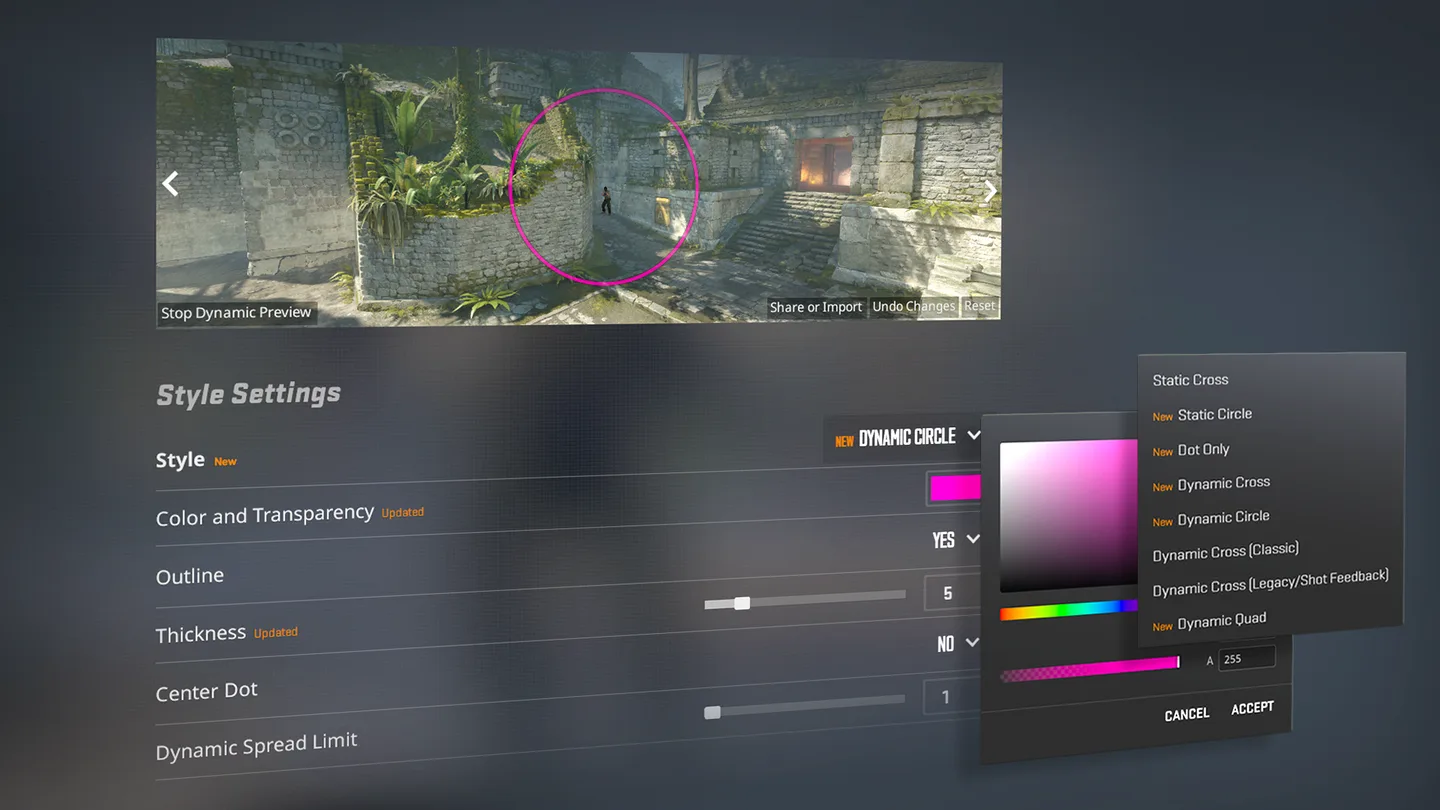
Static Cross
Does not move. The competitive default for twenty years.
Static CircleNew
A fixed ring instead of four arms.
Dot OnlyNew
A single centre point and nothing else.
Dynamic CrossNew
Expands as your accuracy degrades.
Dynamic CircleNew
The ring version of the same idea.
Dynamic Cross (Classic)
The 1.6-era expansion behaviour.
Dynamic Cross (Legacy/Shot Feedback)
Expands when you fire, as the legacy style did.
Dynamic QuadNew
The new default: a static cross plus a separate expanding quad.
The new default is Dynamic Quad, which Valve says represents weapon accuracy more honestly than the old default did. It pairs a static cross you aim with and a separate expanding element that reports how inaccurate you currently are — the sensible answer to an argument the community has had for twenty years, because it stops the expansion from moving the thing you are actually aiming with.
The settings panel itself changed
Three more things are visible in that screenshot and worth knowing before you go looking for them:
- A real colour picker. The row is labelled “Color and Transparency” and marked Updated: a full saturation/brightness field, a hue strip and an alpha value, instead of five preset colours and three RGB boxes.
- Thickness is marked Updated too, and the example sits at 5 — a number that would have been absurd on the old scale. Expect the value you know by heart to mean something different now.
- A live preview on an actual map, with a Stop Dynamic Preview button and arrows to change the scene, plus a new Dynamic Spread Limit setting.
Do your old share codes still work?
Yes — and there is now a picture to prove the system is still there. The Share or Import button is visible in the bottom-right of Valve’s own screenshot of the new panel.
Beyond that: Valve’s notes say nothing about theCSGO- format changing, no bug reports have appeared, and the reference implementation that every crosshair site is built on has not been touched since July.
What genuinely did change is what those numbers draw. A code stores sizes and a style index; resolution independence changes how a size is rendered, and a longer style list changes what an index can mean. So an old code should still import — and may still look different from how it looked last week.
Our CS2 crosshair generatorstill produces valid codes and valid console commands. We are verifying the new style numbering against the game before we change the style list in the tool, because guessing at it would hand you a crosshair that is not the one you picked.
Silent reloads change how you hold an angle
Hold the reload key rather than tapping it and the reload makesno sound at all. The cost is time: a silent reload takes considerably longer than a normal one.
This is a real tactical addition rather than a convenience. The sound of a reload has been free information since 1.6 — it tells the player holding an angle that you are briefly harmless. Now that information has a price, and the decision is yours: reload fast and announce it, or reload silently and be vulnerable for longer.
Separately, and with no downside attached,un-scoping an AWP or SSG is now silent. The scope-in sound still carries; the scope-out no longer does. Quick-scoping and re-peeking an angle both become quieter, and the AWPer who repositions after a miss no longer broadcasts it.
One more competitive detail buried in the notes:ammo_grenade_limit_total now also caps how many grenades a player may buy in a round, not just carry — which closes a gap that mattered mostly to server operators and practice configs.
Premier now picks four maps and rolls a die
The veto is gone. Valve’s reasoning is that time spent learning a map should be rewarded rather than banned away, so both teams now pick:
1. Team 1 picks a map
One pick to open.
2. Team 2 picks two maps
The balancing pair.
3. Team 1 picks the fourth
Two picks each in total.
4. One of the four is drawn at random
Then the match starts.
The strategic effect is that a one-trick lineup can no longer be vetoed off its map, but it cannot guarantee it either — you are buying a one-in-four ticket rather than a certainty.
You can see what you hit
Blood and bullet impact decals both got a clarity and fidelity pass. Valve’s phrasing in the blog is characteristically unserious, but the effect is practical: spray transfers and wall-bangs give clearer feedback about whether you actually connected, which matters most in the exact moments you have no time to check the kill feed.
And then there is the egg
Players started finding a Chicken Egg in their weekly drops. It is not in the patch notes, Valve has not mentioned it, and it currently does nothing.
Strafereports that the game files point towards a pet system, with a tracking diary and accessories. Treat that as datamining rather than an announcement — it is a reasonable reading of the files, not a promise from Valve.
What is in the notes, and is genuinely funny: chickens now take damage from the Zeus x27. Make of the timing what you will.
Everything else in the patch
- Clan tags are back. Pick one of your Steam Community Groups in your player profile and the tag shows next to your name everywhere you play.
- Stickers on the C4. Yes, really.
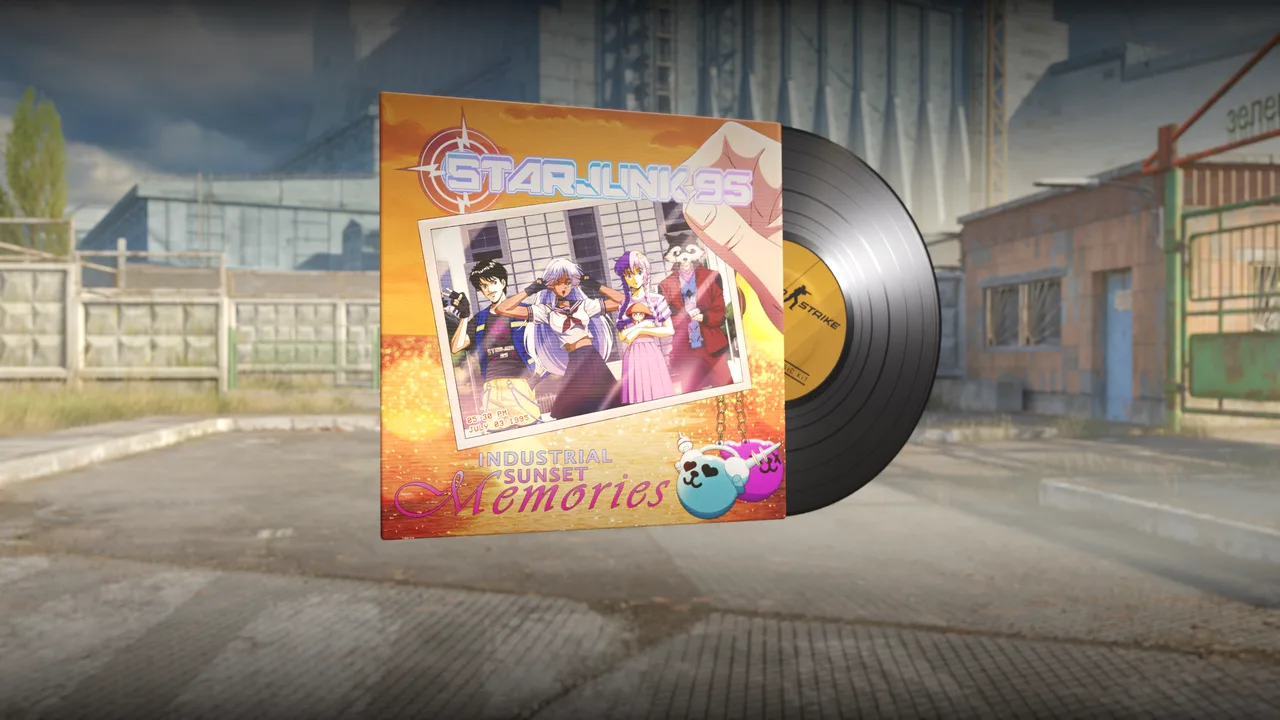
- New music kit: Starjunk 95, Industrial Sunset Memories, in standard and StatTrak.
- Per-mode music volume. Set it differently for Premier and for Deathmatch.
- Engine: updated to the latest version of Source 2.
- Map fixes: Ancient (holes in Long A main hall, door geometry and grenade clipping in Jaguar), Cache (gaps and clipping around the blue doors in mid), Mirage (scaffolding by the A-site balcony), Train (a pixel gap in the A-site crates).
- Fixes: halftime scoreboard stats now reflect the previous round properly, and a way of dodging a kick ban was closed.
- For mapmakers: new
minimap_volume,sky_camera_volume,point_deathcam_boundsandenv_shake_volumeentities, plusCSRadarPoint,CSObservablePoint, anAddTeamMoneymethod and anOnPlayerTeamChangedcallback.
What to do tonight
1. Check your crosshair before you queue
Open the new Crosshair/Scopes tab and look at it on a map, not in the menu. If you play stretched, expect it to have changed apparent size. Re-tune once with ourcrosshair generator and it should hold across resolutions from now on.
2. Try Dynamic Quad honestly
Most players who dismiss dynamic crosshairs are objecting to the aiming point moving. Dynamic Quad keeps the static cross and moves something else. Give it a few deathmatch rounds before going back.
3. Practise the hold-to-reload
It is long enough that doing it at the wrong moment will get you killed. Learn the timing in a casual game, not in a Premier retake.
Sources
Feature details and patch notes:Valve’s official Counter-Strike update notes(the “Rush Hour” post and the accompanying release notes, 22 September 2026). Images in this article are Valve’s own announcement art, re-encoded for the web and used to illustrate coverage of that announcement; the arena names and the crosshair style list are read directly off them. Un-scope delay and the Chicken Egg:Strafe. Additional coverage:HLTV,Dot Esports.
Questions people are asking
Do my old CS2 crosshair share codes still work after the Rush Hour update?
Yes. The Share or Import button is still visible in Valve’s own screenshot of the new crosshair panel, Valve announced no change to the CSGO- format, and no breakage has been reported. What has changed is how the result is drawn: crosshairs are now resolution independent, so the same numbers can render at a different size than before, particularly on a stretched or non-native resolution. Thickness is also flagged as updated in the settings screen, so that value in particular may not mean what it used to.
What is the new default CS2 crosshair?
Dynamic Quad. Valve describes it as a better representation of weapon accuracy. It replaces the previous default and sits alongside the other styles in the new Crosshair/Scopes settings tab.
How do silent reloads work in CS2?
Press and hold the reload key instead of tapping it. The reload makes no sound, but it takes considerably longer than a normal one, so it is a trade of time for stealth rather than a free upgrade.
How do you win a round in CS2 Rush mode?
Rush is a queued 3v3 mode played across randomly selected battle arenas. You win a round by controlling the tower, which happens when you eliminate the enemy team or when the round timer expires. Winning arenas advances you towards the opponent’s castle, and reaching it wins the match.
How does Premier map selection work now?
Instead of banning down to one map, each side now picks. Team 1 picks one map, Team 2 picks two, then Team 1 picks a fourth. One of those four is then chosen at random and the match begins.
Which arenas are in CS2 Rush mode?
Fifteen, all labelled in Valve’s announcement image: T Assault, Spire, Wallbang, Big Box, CT Assault, Sewer, Dogleg, Drop, Crane, Playhouse, Madhouse, Tunnel, King of the Hill, Marksman and Horseshoe. They are drawn at random for each match.
What is the CS2 chicken egg?
An item that began appearing in weekly drops around the update. It is not in Valve’s patch notes and Valve has not explained it. Reporting based on the game files suggests it is groundwork for a pet, but nothing about that is official yet.