GEARFPS.COM

2 ranked

The Best Gaming Room Lighting

One kind of setup lighting has a real effect on how your eyes feel after three hours, and it is not the colourful one. Light behind the screen reduces strain; light in front of it usually adds glare.

Affiliate links

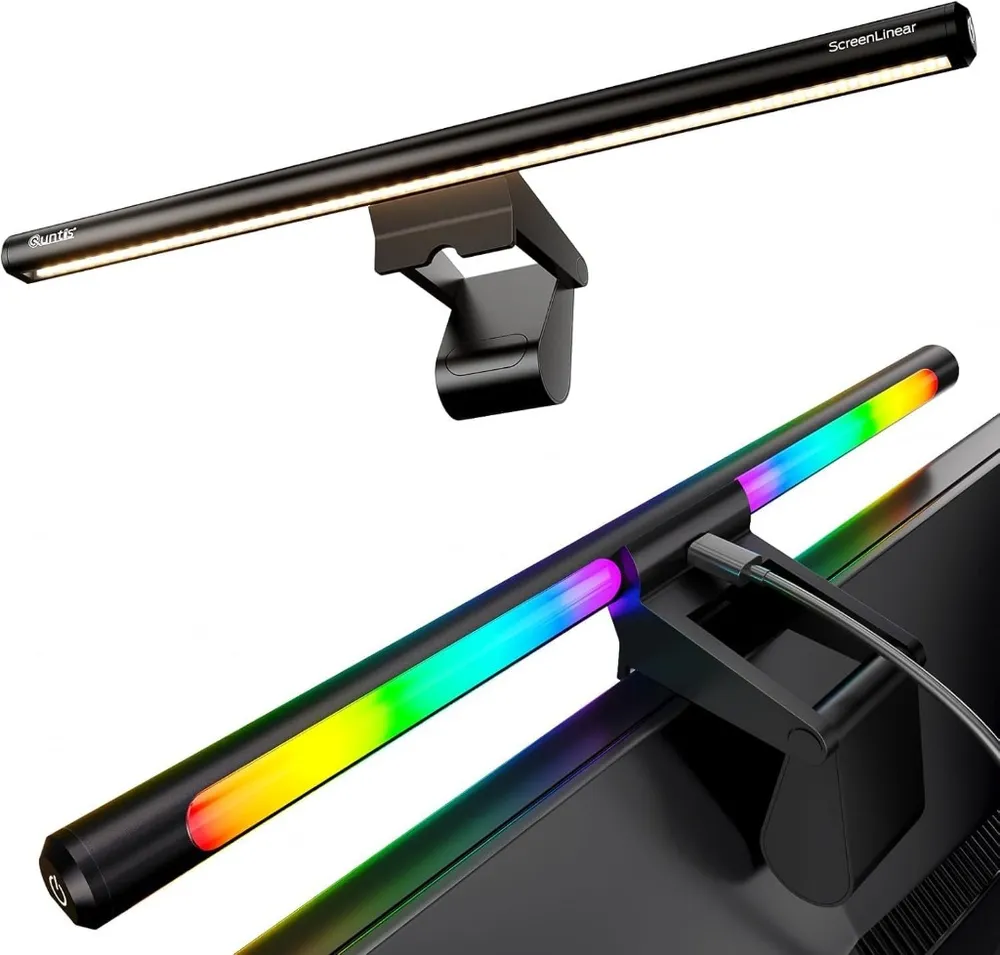
  1. Quntis RGB ScreenBar

    Quntis

    Illuminates your desk and mousepad without reflecting light onto the monitor screen. Reduces eye strain during late-night CS2 gaming sessions while adding customizable RGB mood lighting.

    Illumination
    Asymmetric Front + RGB Back
    Control
    Touch Control
    Power
    USB-C Powered
    Fit
    Flat & Curved Screens
    • Asymmetric optical design lights the desk surface with zero screen reflection or glare
    • Rear-facing RGB ambient light creates an immersive esports ambient glow on the wall behind

    Requires an available USB port on monitor or PC tower for power

    Check Price on Amazon →Full review
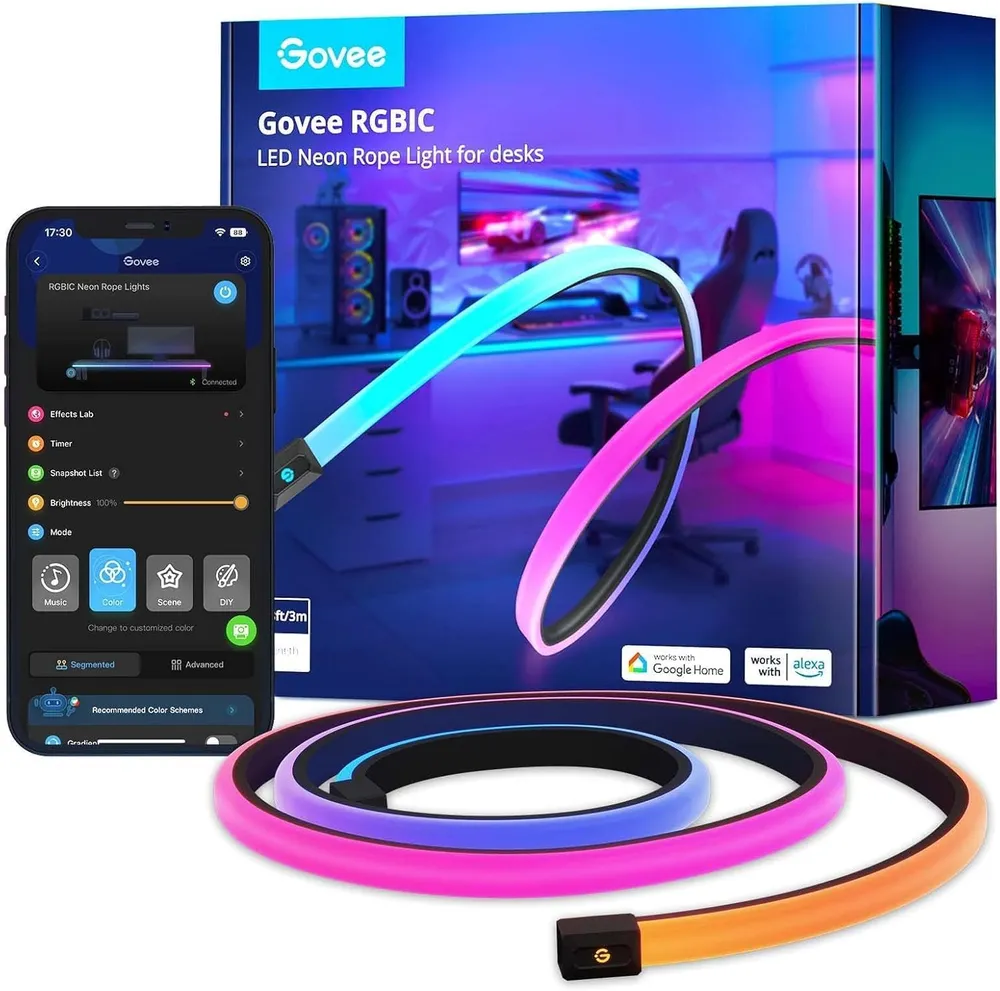
  2. Govee Neon Rope 3 m

    Govee

    A silicone diffuser turns the LED line into a continuous glow with no visible hot spots, and it bends into shapes a flat strip cannot hold. This is the one lighting product here that looks deliberate rather than added.

    Length
    3 m
    Tech
    RGBIC neon rope
    Sync
    Razer Chroma
    Control
    App, Alexa, Google
    • The diffuser hides the individual LEDs entirely — the result reads as a neon tube, not as a strip
    • Bends and holds shape, so it can trace a monitor arm or spell a shape instead of following a straight edge

    Three metres disappears fast once you start tracing shapes rather than running straight lines

    Check Price on Amazon →Full review

Before you buy

What actually decides this

  1. Bias lighting behind the screen

    A dim light on the wall behind your monitor narrows the contrast between a bright screen and a dark room, so your pupils stop adjusting every time you look away. This is the part that actually reduces fatigue.

  2. Nothing in your field of view

    Any light source you can see while looking at the screen competes with it. Aim everything at a wall or a desk surface, never back towards your eyes.

  3. Front lighting without glare

    A desk lamp beside a monitor throws light across the panel. A monitor light bar sits on top and casts asymmetrically downward onto the desk, lighting your keyboard while leaving the screen dark.

  4. Colour temperature

    Around 6500 K matches typical monitor white and keeps the wall behind looking neutral rather than tinting the screen. Warmer is more comfortable late at night.

  5. Control that is not an app

    Anything you have to unlock a phone to dim gets left on the wrong setting. A physical control or a saved scene is what makes lighting get used.

One of these actually does something

Setup lighting splits cleanly into two categories, and they are usually sold as one.

Bias lighting — a dim, neutral light on the wall behind your monitor — has a real and well-understood effect on eye comfort. Decorative lighting — strips, neon rope, colour-cycling anything — makes a room look the way you want it to look, and does nothing for your eyes except when it is badly placed, in which case it makes things worse.

Both are worth buying. Only one of them is worth buying for a reason.

Why light behind the screen helps

Your pupil size is set by the overall brightness your eyes are taking in.

In a dark room with a bright monitor, those two demands conflict constantly. Look at the screen and your pupils narrow. Glance at your keyboard, the wall, your phone, and they widen again. Every one of those adjustments is muscular work, repeated for hours, and the accumulated effort is a large part of what people describe as tired eyes.

A dim light on the wall behind the monitor lifts the brightness of everything around the screen, so the gap between screen and surroundings narrows and the adjustment mostly stops. The screen stays the brightest thing you look at — it just is not the only bright thing in the room.

The light should be aimed at the wall, not at you, and it should be dimmer than the screen. If you can see the source itself while looking at the monitor, it is in the wrong place.

Lighting the desk without lighting the screen

The other half of the problem is seeing your keyboard without washing out the panel.

A conventional desk lamp is bad at this. Placed beside a monitor it throws light across the screen surface, and a matte panel turns that into a dull haze while a glossy one turns it into a reflection of the lamp.

A monitor light bar solves it with geometry rather than brightness. It clamps to the top edge of the screen and its reflector throws light forward and down, onto the desk, with a deliberately sharp cutoff so almost nothing lands on the panel face. That asymmetry is the entire product, and it is why a light bar works where a brighter lamp does not.

Colour temperature, briefly

Around 6500 K is neutral white and close to what most monitors call white. A wall lit at that temperature stays out of the way.

Go much warmer and the wall behind the screen turns orange, which shifts how you read colours on the panel. Go cooler and it turns blue and clinical.

For late sessions, warmer light in the room is more comfortable and there is no competitive cost to it. Just keep the wall directly behind the monitor neutral if you care about what you are seeing.

Placement beats product

Most lighting disappointment is a placement problem sold as a product problem.

Aim at surfaces, never at eyes. Every light in the room should be bouncing off a wall, a ceiling or a desk.

Keep the screen brightest. If the room competes with the monitor, you have made the original problem worse in a different direction.

Hide the source. A strip you can see the individual LEDs of is a row of small glare sources. Tuck it behind an edge so you see the light and not the emitter.

Light the wall, not the back of the monitor. The glow should spread across the wall, which means a few centimetres of gap and a light aimed outward.

What we would ignore

Screen-sync features. Fun for films, actively unhelpful in a competitive game where the wall behind you flashing on every muzzle flare is one more moving thing in your peripheral vision.

Music reactivity. Same reasoning, plus it is in your field of view.

Brightness figures quoted in lumens for a decorative strip. You will run it at a fraction of maximum.

Anything that only dims through a phone app. It will live on one setting forever.

FAQ

Lighting & Decor questions

Does bias lighting actually reduce eye strain?

Yes, and the mechanism is simple. In a dark room your pupils widen for the room and narrow for the bright screen, adjusting constantly. A dim light on the wall behind the monitor raises the surrounding brightness so the gap is smaller and the adjustment mostly stops. It is the one lighting change with a real comfort payoff.

What colour should bias lighting be?

Neutral white, around 6500 K, for anything where the screen's colours matter — it keeps the wall from tinting your perception of the image. If you are playing late and want the room calmer, warmer works fine. Strong saturated colours behind the screen look good on camera and make judging what is on screen harder.

Is a monitor light bar better than a desk lamp?

For a desk with a monitor on it, yes. A lamp beside the screen throws light across the panel and creates reflections. A light bar clamps on top and casts asymmetrically down and forward, so the keyboard and desk are lit and the screen face stays dark.

Do RGB strips do anything for gameplay?

No, and that is fine — they are decoration, and decoration is a legitimate reason to buy something. Just place them so they light a wall rather than pointing at you, and keep the brightness low enough that the screen is still the brightest thing in the room.

Should I play in a completely dark room?

It is the worst option for your eyes. A dark room maximises the contrast between screen and surroundings, which is exactly what causes fatigue over a long session. A dim, evenly lit room with nothing glaring is easier to sit in for hours.

Also picked

The rest of the setup

Read next

Guides that go with this

Full build

The complete setup

This category in context, ranked against every other piece of the setup.

Season 1 · CS2 skin giveaway

CS2 Rifle

M4A1-SBlack Lotus

Field-Tested

One skin, given away every month to subscribers of the YouTube and TikTok channels. Free to enter, no purchase, no gear required.

Claim your ticket

Win a CS2 M4A1-S Black Lotus this month. Free entry for subscribers + daily tickets on Daily Duel.

Enter Free →Daily Duel
YouTube· TikTok