 GEAR
GEARRanked · 2 picks
CS2 Average eDPI & Sens Guide (2026): Find Your Ideal Sensitivity [Pro Data]
Mouse sensitivity dictates aim consistency and recoil control in Counter-Strike 2. This guide analyzes pro average eDPI, compares tier-1 player settings, and gives you a step-by-step method to find your ideal sensitivity.
Published 30 August 2026 · Updated 12 September 2026Affiliate links
What is eDPI and Why Does It Matter in CS2?
Comparing mouse sensitivities between players requires a unified metric because physical mouse DPI settings vary (400, 800, 1600 DPI). eDPI (Effective Dots Per Inch) normalizes sensitivity across different hardware:
$$\text{eDPI} = \text{Mouse DPI} \times \text{In-Game Sensitivity}$$
Two players with different DPI numbers can have the exact same true sensitivity. For example, a player on 800 DPI with 1.0 sensitivity has the identical 800 eDPI as a player on 400 DPI with 2.0 sensitivity.
Tier-1 CS2 Pro Sensitivity & Average eDPI Table
The table below breaks down the mouse settings and calculated eDPI of the world’s best professional Counter-Strike 2 players:
| Player | Team | Role | Mouse DPI | In-Game Sens | Calculated eDPI | Pro Crosshair |
|---|---|---|---|---|---|---|
| donk | Team Spirit | Entry Rifler | 800 DPI | 1.25 | 1000 eDPI | donk Crosshair |
| ZywOo | Team Vitality | AWPer / Hybrid | 400 DPI | 2.00 | 800 eDPI | ZywOo Crosshair |
| m0NESY | G2 Esports | Main AWPer | 400 DPI | 2.00 | 800 eDPI | m0NESY Crosshair |
| NiKo | G2 / Falcons | Rifler | 400 DPI | 1.40 | 560 eDPI | NiKo Crosshair |
| ropz | FaZe Clan | Lurker | 400 DPI | 1.77 | 708 eDPI | ropz Crosshair |
| s1mple | Falcons / NaVi | AWPer | 400 DPI | 3.09 | 1236 eDPI | s1mple Crosshair |
| apEX | Team Vitality | IGL | 400 DPI | 1.85 | 740 eDPI | apEX Crosshair |
| kyousuke | Rising Star | Rifler | 800 DPI | 0.95 | 760 eDPI | kyousuke Crosshair |
| HeavyGod | Cloud9 | Anchor | 800 DPI | 1.10 | 880 eDPI | HeavyGod Crosshair |
Pro Average: The average eDPI in tier-1 competitive CS2 is 820 eDPI. Over 75% of pro riflers play between 600 and 850 eDPI.
High Sens vs. Low Sens: The Tactical Trade-Off
Unlike fast arena shooters (Apex Legends, Overwatch) where targets fly vertically across the screen, Counter-Strike 2 is won on crosshair placement, head-height holding, and tight recoil spray control.
The Case for Low eDPI (500 – 850):
- Micro-Adjustments: Holding narrow angles (e.g., Mirage A-ramp or Inferno banana) requires moving your crosshair by mere pixels. Low eDPI prevents overshooting moving heads.
- Muscle Memory Consistency: Moving your arm across a large mousepad engages shoulder and elbow muscles, which build reliable muscle memory faster than fine wrist twitches.
- Spray Transfer Precision: Pulling down and transferring spray from one target to another remains disciplined and controllable.
Step-by-Step Guide: How to Find Your True Sensitivity
- Lock Native Mouse DPI: Set your mouse to 400 or 800 DPI in your software (avoid ultra-high DPIs that introduce software smoothing).
- Start at the Pro Baseline (800 eDPI): 400 DPI × 2.0 (or 800 DPI × 1.0).
- The 180-Degree Pad Test: Stand in CS2 Practice Mode. A comfortable, natural swipe from the center of your mousepad to the outer edge should rotate your in-game model exactly 180 degrees. If it does less, increase sensitivity; if it does a full 360, lower it.
- The Bot Tracking Test: Spawn a stationary bot in Aim Botz. Strafe left and right while keeping your crosshair locked on the bot’s head. If your crosshair lags behind your movement, your sensitivity is too low. If it shakes and overshoots, your sensitivity is too high.
- Adjust in 0.05 Increments: Once you are close, refine by tiny increments and stick with that setting for at least 10 competitive matches.
Convert Sensitivity & Resolution
- Use our Interactive Sensitivity Converter to transfer your exact sensitivity from Valorant, Apex Legends, or Overwatch.
- Pair your sensitivity with the right visual setup: read our guide on CS2 4:3 Stretched Resolution Explained.
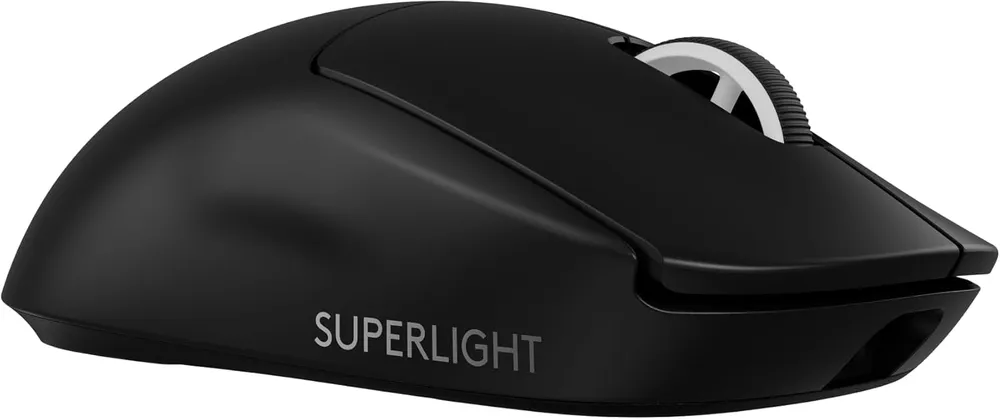
G Pro X Superlight 2
Logitech G
Sixty grams, a wireless link nobody has beaten on latency, and 8 kHz polling. This is the mouse the professional field converged on, and the reasons are boring in the best way.
- Weight
- 60 g
- Sensor
- HERO 2, 44 000 DPI
- Polling
- up to 8 kHz
- Charging
- USB-C
- Sixty grams with no honeycomb shell — the weight comes out of the internals, not out of holes you can feel
- LIGHTSPEED wireless measures faster end-to-end than most wired mice, which retires the cable argument entirely
No side buttons on the right flank, so left-handed players and anyone who binds four thumb keys is out
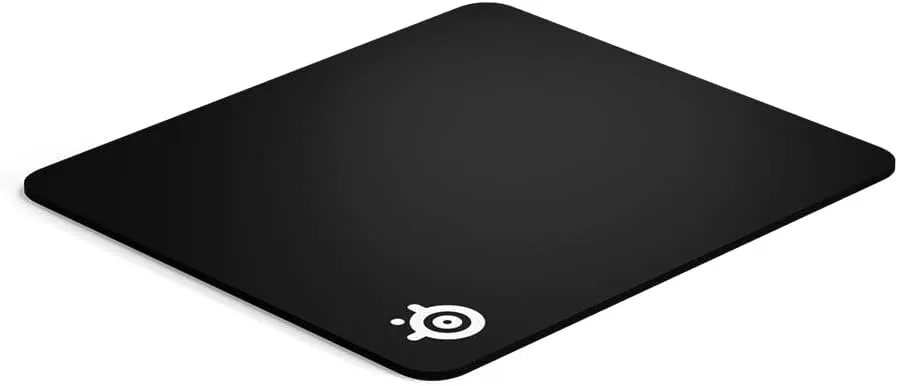
QcK Heavy L
SteelSeries
The pad that has been under professional mice for two decades, in its thick version. Six millimetres absorbs an uneven desk; it also raises the whole surface, which is the part nobody warns you about.
- Size
- 450 × 400 mm
- Thickness
- 6 mm
- Surface
- Micro-woven cloth
- Base
- Non-slip rubber
- Six millimetres flattens a warped or slotted desk, so the sensor sees one consistent surface
- Micro-woven cloth gives control-grade friction that stays predictable as it wears in
That thickness raises your wrist by 6 mm — on a desk already at the right height it forces a slight wrist extension
FAQ
Frequently asked
What is eDPI in CS2?
eDPI (effective Dots Per Inch) is calculated by multiplying your mouse DPI by your in-game sensitivity (DPI × Sensitivity = eDPI). For example, 400 DPI × 2.0 in-game sens = 800 eDPI.
What is the average eDPI used by CS2 pros?
The average eDPI across tier-1 professional CS2 players is approximately 820 eDPI. Riflers generally average lower (700 to 800 eDPI for micro-adjustments), while primary AWPers often play slightly higher (800 to 1000 eDPI for quick flicks).
Is 400 DPI or 800 DPI better in CS2?
Both are tournament standards. 800 DPI offers slightly lower input latency at the sensor level (microsecond differences) and smoother desktop navigation, while 400 DPI remains the classic choice for players who prefer a traditional arm-aiming feel.
How do I convert Valorant sensitivity to CS2?
Divide your CS2 sensitivity by 3.18 to get your Valorant equivalent (or multiply your Valorant sensitivity by 3.18 to convert into CS2). You can also use our interactive sensitivity converter tool.